Aadhaar is a 12-digit unique identification number issued to residents of India by the Government of India. It acts as proof of identity and address and is essential for accessing government services, banking, telecom, and other important facilities. This guide provides a detailed process for Aadhaar Card Download in 2026, including all available methods and necessary precautions.
Understanding e-Aadhaar
The e-Aadhaar is a digital copy of your Aadhaar card provided by UIDAI. It is password-protected and digitally signed, containing all the details of your physical Aadhaar:
- 12-digit Aadhaar number
- Name, date of birth, gender, and address
- Photograph and biometric details
According to the Aadhaar Act 2016, e-Aadhaar is legally valid and can be used for identity and address verification across India.
There are two types of e-Aadhaar you can download:
- Full e-Aadhaar – Shows the complete 12-digit Aadhaar number
- Masked e-Aadhaar – Displays only the last four digits for privacy
Opening the PDF: Password = first four letters of your name (in uppercase) + birth year (YYYY)
- Example: Priya, 1990 → PRIY1990
- Example: Rahul, 1989 → RAHU1989
Essentials Before Downloading Aadhaar
Before starting your Aadhaar Card Download, make sure you have:
- Aadhaar Number (UID), Enrolment ID (EID), or Virtual ID (VID)
- Registered Mobile Number – OTP will be sent here for verification
- Stable Internet Connection – Required for portal or app access
- PDF Reader – To open the downloaded e-Aadhaar card file
If your mobile number is not registered with UIDAI, visit an Aadhaar Seva Kendra (ASK) for assistance.
Ways to Complete Aadhaar Card Download
1. Using the Official UIDAI Portal
The UIDAI website is the primary platform for Aadhaar Card Download.
Steps:
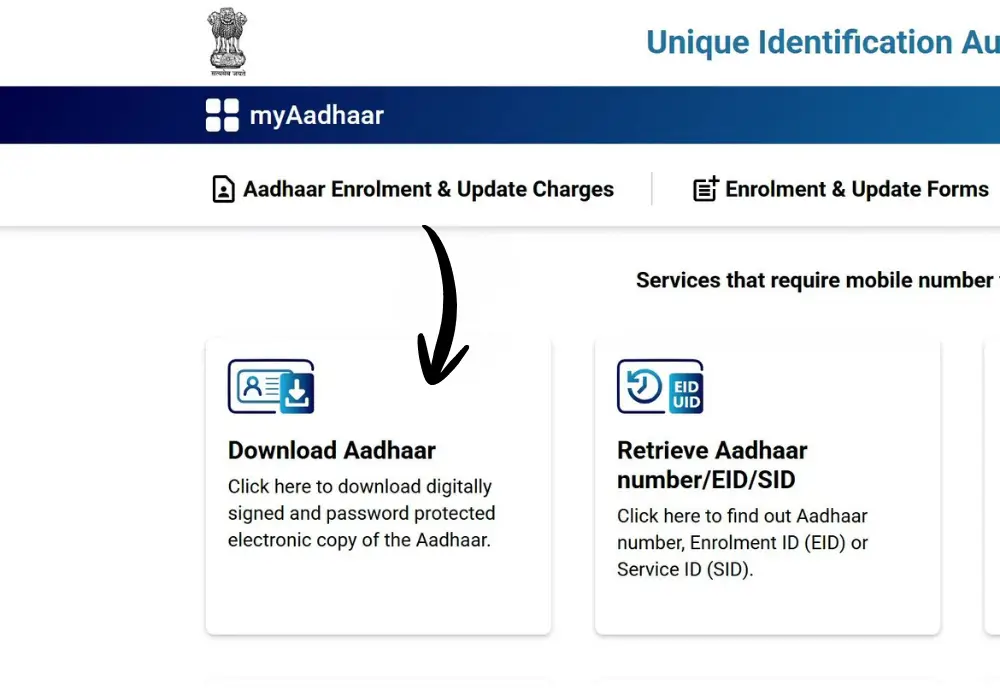
- Visit myAadhaar UIDAI.
- Click Download Aadhaar under the “My Aadhaar” section.
- Choose your identifier:
- Aadhaar Number (12 digits)
- Enrolment ID (28 digits)
- Virtual ID (16 digits)
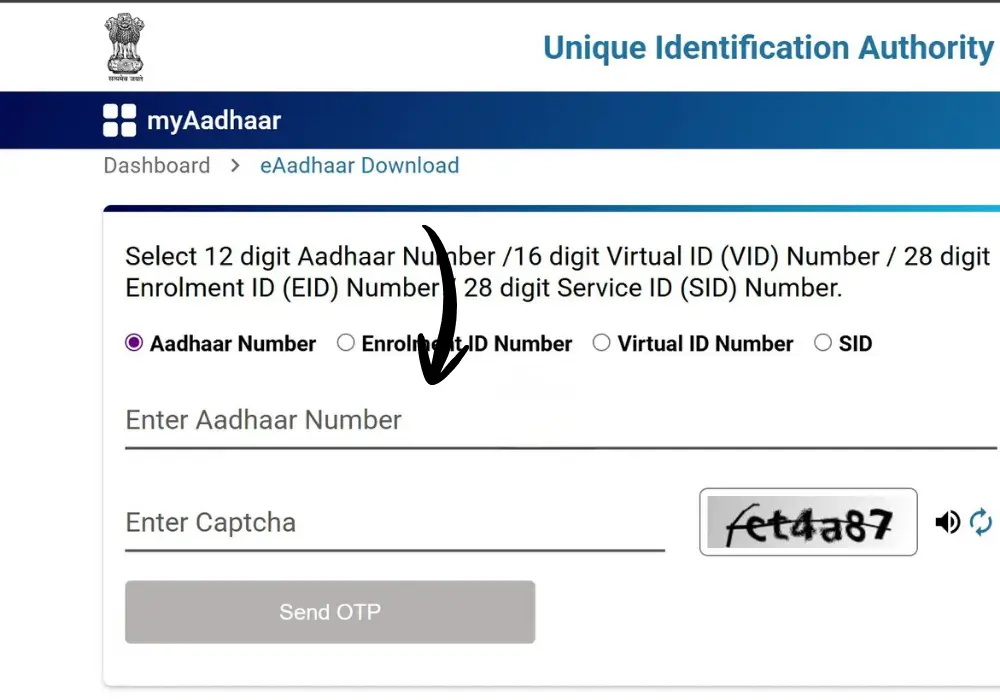
- Enter the captcha code.
- Click Send OTP to your registered mobile number.
- Select Full Aadhaar or Masked Aadhaar.
- Enter OTP → Click Verify & Download.
- Open the downloaded PDF using the password format (first four letters of name + birth year).
Note: If your Aadhaar details were recently updated, the latest information will reflect in your download.
2. Download via mAadhaar Mobile App
The mAadhaar app allows you to manage your Aadhaar on smartphones.
Steps:
- Install the app from Google Play Store or App Store.
- Open the app and select your language.
- Log in with your registered mobile number → OTP verification.
- Go to Get Aadhaar > Download Aadhaar.
- Select Full or Masked Aadhaar.
- Enter Aadhaar Number/EID/VID + captcha code.
- Generate OTP/TOTP → Verify.
- Download the PDF → Open with the password.
The app also allows biometric locking, verification, and PVC card ordering. Address updates are supported; other demographic updates are limited.
3. Accessing e-Aadhaar via DigiLocker
DigiLocker is a government-backed cloud storage platform integrated with UIDAI for Aadhaar services.
Steps:
- Sign in at DigiLocker or through its mobile app.
- Log in with Aadhar number or registered mobile number.
- Search UIDAI → Aadhaar.
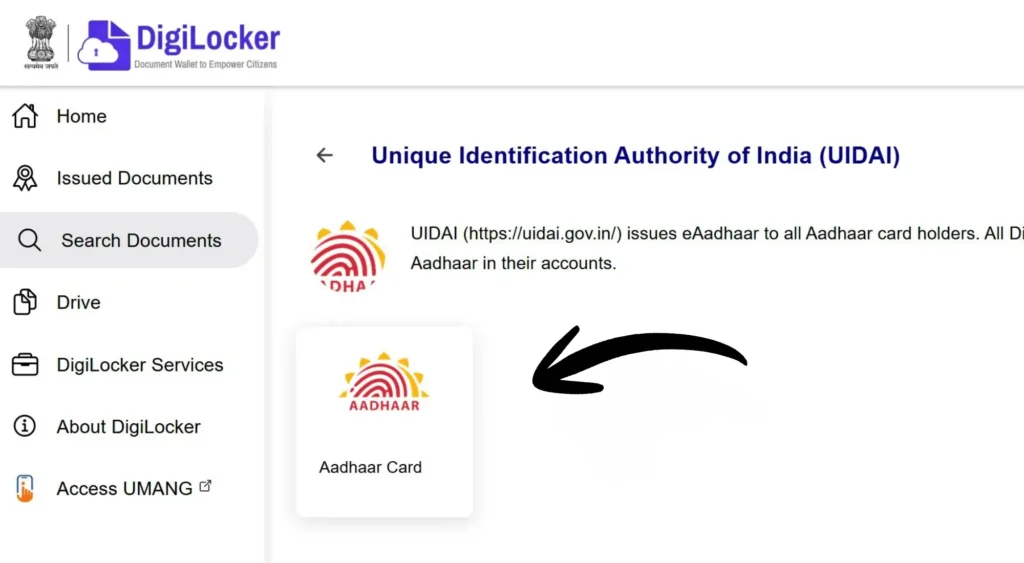
- Enter your 12-digit Aadhaar number → Verify via OTP.
- Download the e-Aadhaar PDF from “Issued Documents”.

- Open PDF with password (first four letters of name + birth year).
4. Retrieving Aadhaar with Name and Date of Birth
If you forgot your Aadhaar number or EID:
- Visit myAadhaar portal → Retrieve EID / Aadhaar Number.
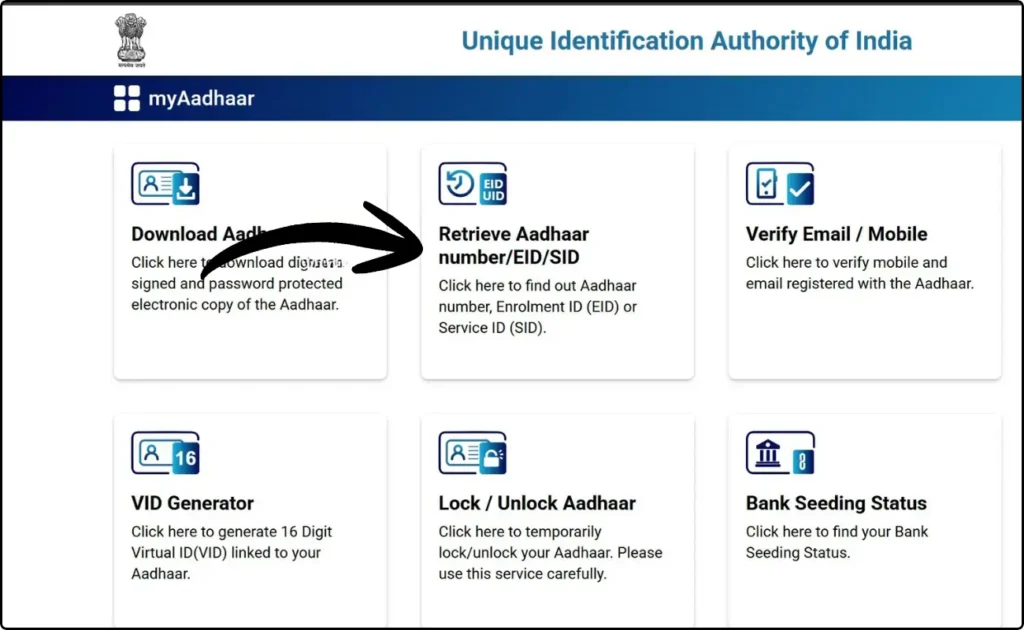
- Enter full name, mobile/email, date of birth.
- Complete captcha → Click Send OTP.
- Verify OTP received on mobile/email.
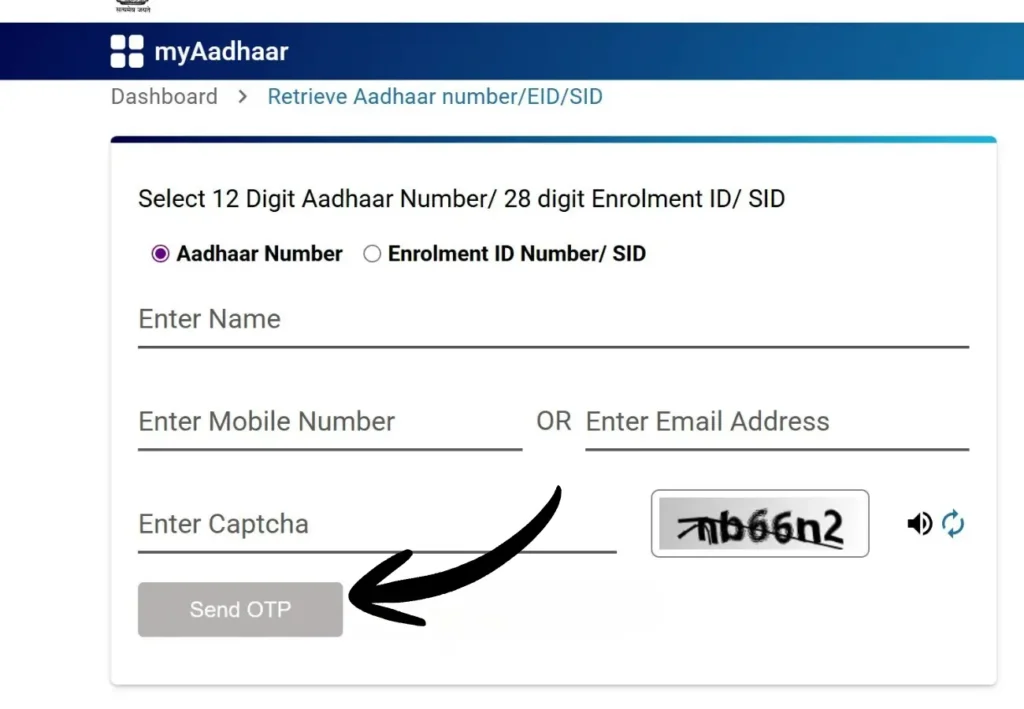
- Your Aadhaar or EID will be sent to your contact details.
- Use this number for Aadhaar Card Download via UIDAI portal.
5. Download Without Registered Mobile Number
If your mobile phone number is not linked with Aadhaar:
- Visit the nearest Aadhaar Seva Kendra (ASK).
- Complete biometric verification (fingerprint/iris).
- Carry valid identity documents.
- ASK staff can provide a printed copy (₹30 normal, ₹50 PVC).
Printing Your e-Aadhaar
Once downloaded:
- Open PDF using a PDF reader.
- Enter password: first four letters of your name + birth year.
- Select Print and the number of copies.
Printed e-Aadhaar is fully valid.
Password Examples:
| Name | Birth Year | Password |
| Sameer Sarkar | 1990 | SAME1990 |
| Raj Yadav | 1988 | RAJY1988 |
| Ria Sharma | 1990 | RIAS1990 |
| R.M. Kumar | 1989 | R.M.1989 |
| Sai | 1989 | SAI1989 |
Masked Aadhaar – Privacy-Focused e-Aadhaar
The Masked Aadhaar shows only the last four digits of your Aadhaar for secure sharing.
Advantages:
- Prevents misuse during KYC, rentals, or employment checks.
- Legally equivalent to the original Aadhaar.
- Includes demographic details, photograph, QR code; excludes biometric data.
- Free to download.
Steps:
- Go to myAadhaar portal.
- Click Download Aadhaar → Enter Aadhaar/VID + captcha.
- Select Masked Aadhaar → Click Send OTP.
- Enter OTP → Click Verify & Download.
- Open PDF using password.
Ensure your mobile number is registered; otherwise, update it at an Aadhaar Enrolment Centre.
Frequently Asked Questions
Q1: How do I download my Aadhaar online?
- Visit UIDAI portal or mAadhaar app → Enter Aadhaar/EID/VID → Verify OTP → Download PDF.
Q2: Is e-Aadhaar valid as the original?
- Yes, it is digitally signed and legally valid.
Q3: PDF password format?
- First four letters of your name (uppercase) + birth year. Example: RAME1995.
Q4: Can I download Aadhaar without a registered mobile?
- Yes, visit the nearest Aadhaar Seva Kendra.
Q5: How many times can I download Aadhaar?
- Unlimited, free from UIDAI platforms.
Q6: How to download via mAadhaar app?
- Install app → Login → Verify OTP → Dashboard → Download Aadhaar.